

How to Use ChatGPT to Print a Children's Book Today

Key Highlights
- ChatGPT can help you plan, structure, and draft a complete children's book, but human editing is essential to refine tone and readability for young audiences.
- Creating a print-ready children's book requires illustrations, layout design, and proper formatting beyond AI-generated text.
- Professional tools like Adobe InDesign ensure correct page structure, bleed, and image placement for printing.
- Print quality depends on paper stock, binding choice, and colour accuracy, especially for illustration-heavy books.
- A professional printing partner ensures consistent output, durable materials, and reliable turnaround for both single copies and bulk runs.
Most people can write a children’s story with ChatGPT. The hard part is turning it into a real printed book that actually looks professional.
A good story alone isn’t enough. Children’s books depend on pacing, illustrations, layout, and print quality to feel complete, and this is where most creators struggle.
This guide walks you through the full process, from generating a story with ChatGPT to producing a polished, print-ready children’s book you can confidently share.
What ChatGPT Can and Cannot Do in a Children’s Book Workflow?
ChatGPT can accelerate the early stages of creating a children’s book, but it cannot take a project from idea to print-ready product on its own. Understanding where it adds value and where human input is essential is key to producing a book that feels complete and professional.
What AI handles well: ChatGPT is highly effective for generating story ideas, drafting simple narratives, creating character concepts, and experimenting with tone or themes. It helps overcome blank-page friction and speeds up the initial writing process.
What still needs a human: Pacing, emotional nuance, age-appropriate language, and overall storytelling quality require human judgment. More importantly, illustrations, visual consistency, and layout decisions cannot be fully handled by text-based AI alone.
What’s needed before the book is printable: A print-ready children’s book demands structured formatting, aligned text and visuals, proper page design, and the right print specifications. These elements ensure the book looks polished, cohesive, and suitable for physical production, something AI alone cannot finalise.
Getting this balance right is what turns an AI-assisted draft into a children’s book that’s truly ready for print.
How to Turn a ChatGPT Idea Into a Usable Story Draft?

A structured workflow ensures you get usable, high-quality output instead of scattered ideas. When you approach this step-by-step, ChatGPT becomes far more effective as a creative assistant rather than just a text generator.
Follow these practical steps:
Step 1: Generate a Story Idea and Theme
Define the story’s purpose, tone, and age group clearly to get usable output from the start.
Example: “Write a calming bedtime story for 4–6-year-olds about kindness and sharing.”
Step 2: Create Characters and Story Structure
Establish a simple framework with a main character, goal, conflict, and resolution to guide the narrative.
Example: “Create a 3-part story with a beginning, problem, and happy ending about a shy rabbit learning to make friends.”
Step 3: Write the First Draft Using ChatGPT
Generate the draft with clear constraints on tone, language, and reading level to match your audience.
Example: “Write this story using short, simple sentences for 5-year-olds with a playful, warm tone.”
Step 4: Edit and Refine the Story
Improve clarity, flow, and emotional impact by removing repetition and simplifying language.
Example: Replace repeated phrases and shorten long sentences to make the story easier to read aloud.
Step 5: Break the Story into Pages
Structure the story into pages or spreads to ensure proper pacing and visual storytelling.
Example: Divide the story into 24-32 pages, keeping one key idea or moment per page.
By following this process, you're not just generating a story; you're building a structured, reader-ready foundation that's far easier to refine, illustrate, and publish successfully.
Ready to turn your story into a beautifully printed book? Check out Ex Why Zed Children's Book Printing for professional-quality results, fast turnaround, and expert support at every step.
How to Create Illustrations for a ChatGPT Children's Book?
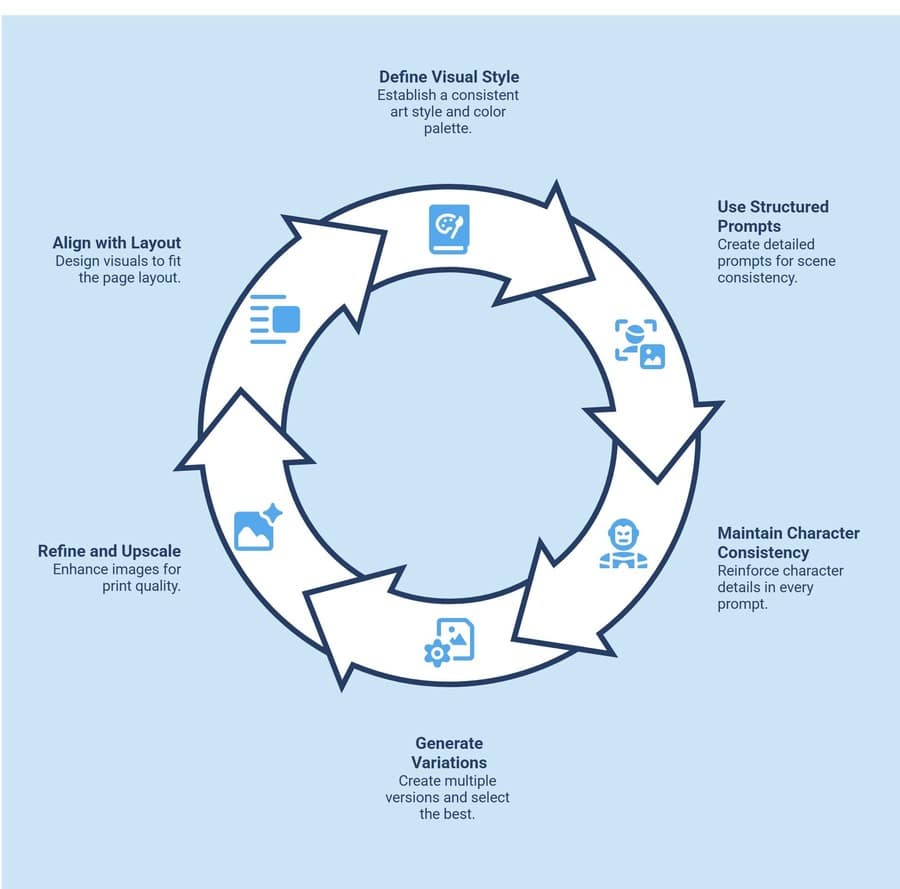
Before generating illustrations, it’s important to approach them as a structured system rather than isolated images. Consistency in style, character design, and layout is what transforms individual visuals into a cohesive children’s book that feels professionally designed and ready for print:
1. Define a Clear Visual Style Before Generating Images
Start by locking in a specific art style, colour palette, and mood to ensure consistency across all illustrations.
Example: “Watercolour style, soft pastel colours, warm lighting, child-friendly characters with rounded features.”
2. Use Structured Prompts for Scene Consistency
Generate illustrations scene-by-scene using detailed prompts that include character traits, environment, and mood.
Example: “A small brown rabbit wearing a red scarf standing in a forest at sunset, soft lighting, same character style as previous image.”
3. Maintain Character Consistency Across Pages
AI tools can vary outputs, so you need to reinforce character details in every prompt to avoid visual inconsistency.
Example: Repeat defining traits like clothing, colours, and proportions in every prompt to keep the character recognisable.
4. Generate Variations and Select the Best Outputs
Create multiple versions of each scene and curate the strongest ones rather than relying on a single output.
Example: Generate 3-5 variations of one illustration and select the one with the best composition and clarity.
5. Refine and Upscale for Print Quality
Raw AI outputs often need enhancement to meet print standards, including resolution and sharpness.
Example: Upscale images to 300 DPI and adjust brightness/contrast to ensure colours print accurately.
6. Align Illustrations with Page Layout
Design visuals with your book layout in mind so text and images work together without clutter.
Example: Leave negative space in illustrations where text will be placed on each page.
The difference between average and professional-looking children’s books lies in how consistently and intentionally the illustrations are created, refined, and aligned with the story.
How Much Does It Cost to Print a Children's Book in the UK?
It's important to understand the cost factors involved so you can plan realistically. Printing a children's book in the UK varies based on size, format, quantity, and quality choices, all of which directly impact your final budget.
| Cost Factor | Typical Range (UK) | What It Means in Practice |
| Print Quantity | £2 - £10 per book | Larger print runs reduce cost per copy, while small batches (print-on-demand) are more expensive per unit. |
| Book Size & Format | Varies by trim size | Square or custom sizes cost more than standard portrait formats due to the complexity of printing and cutting. |
| Page Count | £0.01 - £0.05 per page | More pages increase printing cost, especially for full-colour illustrated books. |
| Colour vs Black & White | £3 - £8 extra per book | Full-colour printing is standard for children's books but significantly raises overall cost. |
| Paper Quality | £0.50 - £3 extra per book | Thicker, high-quality paper improves durability and visual appeal but increases production costs. |
| Binding Type | £1 - £4 per book | Paperback is cheaper, while hardcover adds durability and perceived value at a higher cost. |
| Illustration Costs | £50 - £200+ per illustration | Hiring an illustrator can be one of the biggest expenses, depending on style and experience. |
| Design & Layout | £50 - £300 (one-time) | Professional formatting ensures print-ready files and reduces costly errors during production. |
Estimated Total:
- Low-budget (POD + AI tools): £3 - £8 per book
- Mid-range (small print run): £8 - £15 per book
- High-quality (professional print + illustrator): £15 - £30+ per book
Understanding these costs helps you make smarter decisions about where to invest, whether it's higher print quality, better illustrations, or keeping production lean for testing and early sales.
How to Make a Children’s Book Print-Ready?
Once your story and illustrations are complete, the next crucial step is turning everything into a print-ready format. This stage goes beyond simple layout; it ensures your book looks professional, prints accurately, and delivers a smooth, visually appealing reading experience for children.
1. What Book Size and Layout Work Best for Children’s Books?
Common formats include:
- Square books for younger audiences
- Landscape layouts for visual storytelling
- Portrait formats for structured content
Your choice affects both readability and production cost.
2. How to Set Up Your Book Files for Print?
Adobe InDesign is the industry standard for print layout. It gives you full control over how your final file will appear in print.
It allows you to:
- Set bleed and margins accurately
- Control typography and spacing
- Prepare files for professional printing
3. How to Make Text Easy for Children to Read
Typography directly affects readability.
- Use large, clear fonts
- Maintain strong contrast
- Ensure consistent spacing
This improves both readability and visual appeal.
4. Structure and Prepare a Print-Ready PDF
Before printing, your file must be correctly prepared.
- Export in CMYK colour mode
- Ensure 300 DPI resolution
- Include bleed settings
- Embed all fonts
Skipping this step often leads to print errors. Reviewing professional resources on print-ready file setup and binding preparation can help ensure accuracy.
How to Choose the Right Printing Setup for Your Children’s Book?
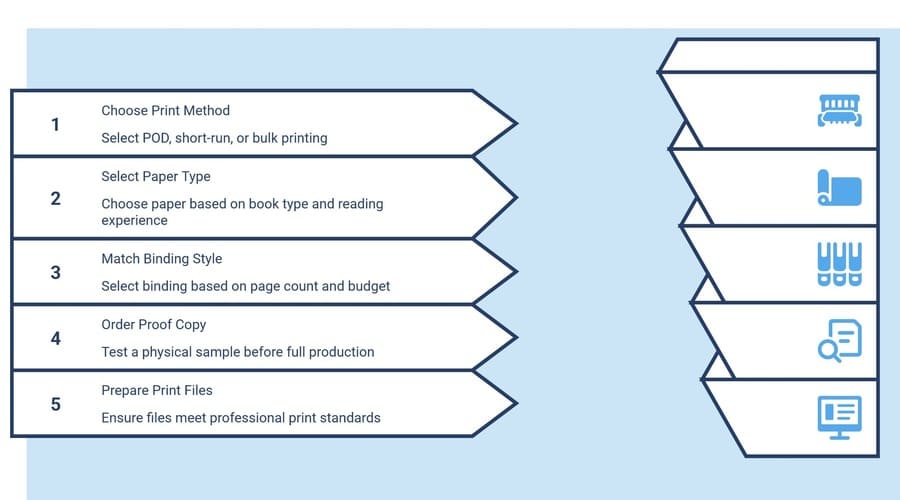
Once your book is finalised, printing becomes a strategic decision, not just a technical step. The choices you make here affect cost, quality, durability, and distribution, so it’s important to align your printing setup with your goals and audience.
1. Print Method: POD vs Short-Run vs Bulk
Choose a printing approach based on volume, risk, and distribution plans.
Example: Use print-on-demand (POD) for testing or selling online with no upfront inventory, short-run (50–200 copies) for small launches, and bulk printing (500+) for lower per-unit cost when demand is proven.
2. Paper Choice Based on Book Type
Select paper that complements the reading experience and illustration style.
Example: Use thick, coated paper (e.g., 150–170 gsm silk or gloss) for colourful picture books, and lighter uncoated paper for text-heavy early readers to reduce glare and cost.
3. Binding Based on Page Count and Budget
Match binding style to durability needs, page count, and positioning (budget vs premium).
Example: Saddle stitch for books under 32 pages, perfect binding for standard paperbacks (40–80 pages), and hardback for premium editions or gift-focused children’s books.
4. Always Order a Proof Copy First
Test a physical sample before committing to a full print run to catch layout, colour, or material issues.
Example: Order a single proof copy to check colour accuracy, margins, text readability, and overall finish before approving final production.
5. Print File and Colour Preparation
Ensure your files meet professional print standards to avoid costly errors.
Example: Export in CMYK colour mode, use 300 DPI images, include bleed (typically 3 mm), and follow the printer’s exact PDF specifications.
The right printing setup is what separates a basic output from a book that feels intentional, durable, and ready to sell or share at a professional standard.
What Mistakes Should You Avoid When Turning a ChatGPT Story Into a Real Book?
Using ChatGPT can significantly speed up the writing process, but relying on it without the right approach often leads to flat, generic, or unusable results. Understanding the most common mistakes helps you avoid extra editing, improve quality, and create a book that actually connects with young readers.
1. Relying on Vague Prompts
One of the biggest mistakes is using unclear or generic prompts like "write a kids' story." This usually results in bland, unfocused output.
What to do instead: Be specific about age group, tone, theme, and purpose. Clear prompts produce clearer, more usable stories.
2. Skipping Story Structure
Jumping straight into generating a full story without defining characters, conflict, and resolution often leads to messy or confusing narratives.
What to do instead: Build a simple structure first, main character, goal, problem, and ending, before asking for a full draft.
3. Overlooking Repetition and Generic Writing
ChatGPT-generated content can feel repetitive or predictable when used without review, reducing engagement among young readers.
What to do instead: Edit actively, remove repeated phrases, simplify language, and add unique touches to make the story feel fresh and intentional.
4. Ignoring Age-Appropriate Language
Not tailoring vocabulary and sentence length to your target age group can make the story either too complex or too simplistic.
What to do instead: Always define the reading level and adjust sentence length, tone, and word choice accordingly.
5. Treating Text and Illustrations Separately
Many creators focus only on the story and think about visuals later, creating a disconnect between pacing and storytelling.
What to do instead: Plan with illustrations in mind, write scenes that naturally translate into visuals and leave space for imagery.
6. Skipping the Editing Phase
Publishing or finalising a draft directly from ChatGPT without refinement yields low-quality results.
What to do instead: Review for flow, clarity, emotional impact, and read-aloud rhythm before moving to layout or design.
7. Expecting a Finished Book in One Go
Trying to generate the entire book in a single prompt often results in inconsistent tone and structure.
What to do instead: Work step-by-step, idea → structure → draft → edit → layout for better control and higher quality output.
Avoiding these mistakes ensures you're not just using ChatGPT for speed, but using it effectively to create a children's book that feels thoughtful, engaging, and professionally crafted.
If you're looking to make your book instantly grab attention, don't miss this guide on Stand Out with These Eye-Catching 10 Book Cover Ideas for creative inspiration that can elevate your design.
Why Ex Why Zed Is Ideal for Printing Children's Books?
Turning a finished file into a book that actually looks and feels professional is where most projects break down. Ex Why Zed is built for this exact stage, helping creators move from print-ready PDFs to consistently high-quality, physical books without costly errors.
Why creators choose Ex Why Zed?
- Fast turnaround (3–7 working days) to keep production timelines tight
- Seamless support for Adobe InDesign and print-ready PDF workflows
- Pre-print file checks to catch layout, bleed, and formatting issues early
- Flexible print runs, from one-off copies to large-scale bulk orders
- Extensive paper stocks and binding options tailored to children’s books
- Accurate, consistent colour reproduction across every copy
- Reliable print quality with professional-grade finishing
- Reduced risk of production errors that affect final output
With Ex Why Zed, your project doesn’t just get printed, it’s produced to a standard that feels intentional, cohesive, and ready for readers.
Ready to turn your print-ready file into a professionally finished children’s book? Get started with Ex Why Zed today.
Conclusion
ChatGPT makes it easier than ever to start writing a children's book, but the real value lies in how you develop that idea into a finished product. A well-structured story, supported by thoughtful illustrations and accurate formatting, creates a book that feels complete and professional. By following a clear process and paying attention to print preparation, you can avoid common pitfalls and produce a book that reflects your original vision. Taking the time to refine each stage ensures your final output is not just readable, but something you can confidently share, publish, or present.
FAQs
1. Can ChatGPT help promote a children's book on social media?
Yes, ChatGPT can assist in creating engaging social media captions, ad copy, and storytelling hooks using artificial intelligence. While it supports marketing ideas, you'll still need human creativity to align messaging with your book's tone and audience expectations.
2. How does ChatGPT ensure the right style of a children's book?
As a language model developed by OpenAI, ChatGPT can adapt its style to that of a children's book through prompts. However, you must refine tone, simplify punctuation, and ensure consistency so the final story feels natural and age-appropriate.
3. What tools can improve illustrations for a children's picture book?
Tools like MidJourney and Photoshop can enhance visuals for a picture book, from concept generation to final editing. AI helps with drafts, while design tools refine details such as the front cover, ensuring a polished, cohesive visual experience.
4. What additional pages should a professionally printed children's book include?
Beyond the story, include elements like a front cover, title page, and dedication page to give your book a complete feel. If publishing on Amazon, these details improve presentation, credibility, and overall reader experience.
5. Is it possible to fully automate writing and illustrating a child's book using ChatGPT?
While the use of AI can automate drafting and basic visuals, full automation isn't practical. Tools can generate stories about characters like Lily, but human input is still needed for emotional depth, illustration consistency, and final print-ready quality.