


Key Highlights
- AI tools now allow you to create children’s book illustrations in minutes, removing traditional cost and time barriers
- No formal design skills required, just structured prompts and creative direction
- Ideal for self-publishing authors, educators, and creators on a budget
- Enables rapid prototyping and testing of multiple visual styles
- Consistency and print quality still require human refinement
- Covers tools, workflows, prompts, and publishing best practices in one guide
- Widely used for platforms like Amazon KDP and digital publishing
- Combines speed of AI with strategic execution for professional results
Creating a children’s book has traditionally required a combination of storytelling, artistic skill, and significant investment. For many aspiring authors, illustration has often been the biggest barrier, whether due to cost, time, or difficulty finding the right artist.
Today, that landscape is shifting rapidly. With the rise of AI-powered illustration tools, authors, educators, and entrepreneurs can now generate high-quality visuals in minutes, without formal design training. What once took weeks can now be prototyped in a single afternoon.
This guide walks you through everything you need to know, from how AI illustration works to the best tools in 2026, practical workflows, prompt strategies, and how to turn your AI-generated visuals into a professionally printed children’s book.
Can You Use AI to Illustrate a Children's Book?
Yes, you can absolutely use AI to illustrate a children’s book, and many creators are already doing so successfully. AI tools can generate consistent, high-quality visuals across different styles, making them ideal for storytelling, prototyping, and even final publishing.
AI is particularly useful for:
- Self-publishing authors on a budget
- Rapid concept development
- Creating multiple visual styles quickly
- Testing ideas before investing in a human illustrator
However, while AI accelerates production, it still requires thoughtful direction, especially for storytelling consistency and print quality.
What Is AI Children’s Book Illustration and How Does It Work?
AI illustration uses artificial intelligence tools to turn text prompts into images. By analysing large datasets of art styles, these tools can generate original visuals from simple descriptions, making it easy for children’s book creators to bring ideas to life.
AI can produce a wide range of styles, from watercolour to hand-drawn looks. The key is writing clear, detailed prompts, as better descriptions lead to better results.
However, AI still needs human guidance. You’ll need to refine outputs, maintain consistency, and shape the final look to create a cohesive and engaging book.
When Should You Use AI for Children's Book Illustration?

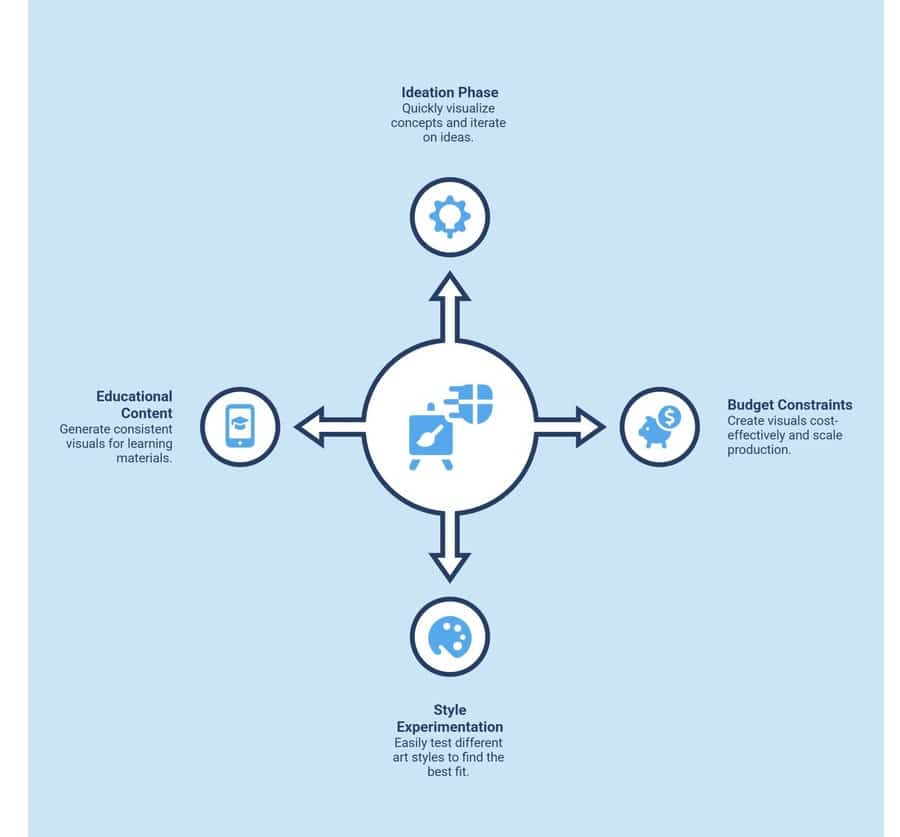
AI is most effective when you need speed, flexibility, or cost efficiency.
Use AI when:
You’re in the Ideation or Prototyping Phase
- Rapid concept visualisation: AI helps you quickly turn rough ideas into visuals, making it easier to see how scenes, characters, and settings might look without waiting on manual sketches.
- Faster creative iteration: You can tweak prompts and instantly generate variations, allowing you to explore different directions before finalising your concept.
Budget Constraints Limit Hiring Illustrators
- Cost-effective visual creation: AI tools reduce the need for expensive initial illustration work, helping you create usable visuals at a fraction of the cost.
- Scalable production: You can generate multiple illustrations without increasing costs, making it ideal for projects with tight budgets or limited resources.
You Want To Test Multiple Art Styles
- Style experimentation made easy: AI allows you to switch between styles, like watercolour, cartoon, or realistic, just by adjusting your prompt.
- Finding the right visual identity: By testing different looks, you can identify the style that best fits your story before committing to a final direction.
You’re Creating Educational or Short-Form Content
- Quick content generation: AI speeds up the creation process, making it easier to produce visuals for short books, worksheets, or learning materials.
- Consistent and repeatable visuals help maintain a uniform style across multiple illustrations, which is especially important for educational clarity and engagement.
Avoid relying solely on AI when:
- You need highly unique, signature artwork
- Brand identity or IP ownership is critical
Can AI Illustrations Be Used for Publishing and Printing?

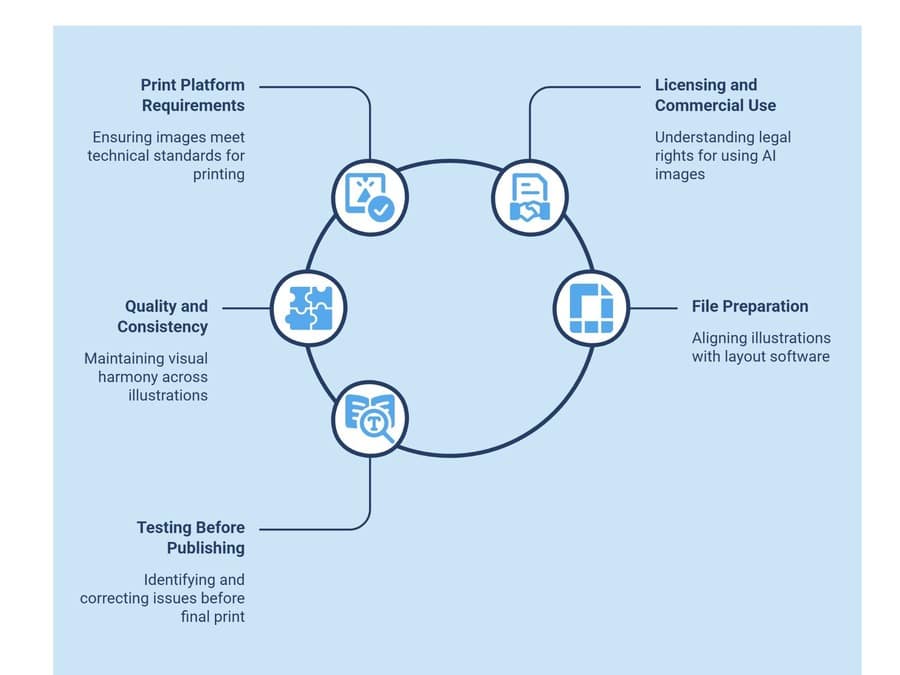
Yes, AI illustrations can be used for publishing and printing, and they are already widely used in self-published books on platforms like Amazon KDP. However, using them successfully is not just about generating images. It is about ensuring they meet technical, legal, and visual standards required for professional publishing.
Here’s what you need to consider before taking AI-generated illustrations to print.
1. Meeting Print Platform Requirements
Your illustrations must meet strict technical specifications to avoid quality issues during printing.
Most print-on-demand platforms require images to be at least 300 DPI for sharp results. Anything lower can appear blurry or pixelated when printed. You also need to match your image dimensions to your book’s trim size to avoid distortion or unwanted cropping.
For full-page illustrations, bleed and margin settings are critical. Extend your images beyond the trim line to prevent white edges, and keep important elements within safe margins.
Additional points to watch:
- Use the correct aspect ratio from the start to reduce resizing later
- Avoid stretching AI images, as it reduces quality
- Keep file formats print-friendly, such as PNG or high-quality JPEG
- Maintain consistent resolution across all pages
- Double-check spine and gutter space for illustrated spreads
2. Understanding Licensing And Commercial Use
Before publishing, you need clarity on how you are legally allowed to use AI-generated images.
Each AI tool has its own licensing terms. Some platforms allow full commercial use, while others may limit usage depending on subscription level or generation method.
It is also important to understand that in most cases, you are granted usage rights, not full ownership. This distinction matters, especially if you plan to sell your book at scale or expand into merchandising.
Additional points to consider:
- Verify if attribution is required by the AI platform
- Check for restrictions on selling or redistributing images
- Avoid generating content that mimics copyrighted styles too closely
- Keep a record of the tool and prompts used for compliance
- Review marketplace policies (like KDP) regarding AI-generated content
3. Managing Quality, Consistency, And Visual Flow
AI can generate high-quality images, but maintaining consistency across a full book requires extra effort.
Character appearance, clothing, colours, and proportions can change subtly between generations. Without control, this breaks immersion, especially in children’s books where familiarity matters.
You will likely need to refine images manually or use editing tools to align visuals across pages.
Print behaviour is another factor. Colours may shift when converting from RGB to CMYK, and small details may not translate well onto paper.
Additional best practices:
- Lock character descriptions and reuse them across prompts
- Create a colour palette and stick to it
- Use reference images to guide consistency
- Simplify overly detailed images for better print clarity
- Maintain consistent lighting and scene composition
4. Preparing Files For Layout And Book Design
Even strong illustrations can fail if they are not properly integrated into your book layout.
Plan how each image fits with text, whether as full-page spreads, spot illustrations, or background elements. This helps maintain a smooth reading experience.
Before exporting, ensure all files are aligned with your layout software or publishing template.
Key preparation steps:
- Align illustrations with text placement to avoid overlap issues
- Use consistent spacing and alignment across pages
- Export files in print-ready formats with correct colour settings
- Name and organise files clearly for easy sequencing
- Preview the full book layout before final export
5. Testing Before Final Publishing
Skipping this step is one of the most common mistakes.
A test print helps you identify issues that are not visible on screen, such as colour shifts, cropping errors, or low-resolution areas.
It also allows you to evaluate the overall reading experience, including pacing, visual flow, and clarity.
What to check during testing:
- Colour accuracy and brightness in print
- Image sharpness and detail retention
- Alignment with margins and bleed
- Consistency across all pages
- Overall visual storytelling flow
Which Are the 5 Best AI Tools to Illustrate a Children's Book in 2026?
Choosing the right AI illustration tool depends on what you need most, whether it’s artistic quality, consistency, ease of use, or commercial safety, so understanding these differences will help you make a faster, more confident decision.
1. Midjourney


What is Midjourney best for:
Best if you want visually striking, stylised illustrations where artistic quality matters more than strict control or consistency.
Key capabilities:
- Produces painterly, fantasy-style visuals ideal for children’s books
- Strong control over lighting, composition, and mood
- Fast generation with multiple variations per prompt
- Paid plans only (no longer free tier)
- Commercial usage allowed under subscription
- Slight learning curve due to prompt structure
2. DALL·E

What is DALL·E best for:
Clean, versatile illustrations with strong prompt understanding and consistency.
Key capabilities:
- Excellent at interpreting detailed prompts accurately
- Supports inpainting and editing existing images
- User-friendly interface
- Freemium access with usage limits
- Suitable for beginners and rapid prototyping
- Commercial use is generally permitted
3. Adobe Firefly
What is Adobe Firefly best for:
Commercial-safe, brand-aligned illustrations integrated into professional design workflows.
Key capabilities:
- Trained on licensed datasets (strong legal safety)
- Seamless integration with Adobe tools (Photoshop, Illustrator)
- Ideal for scalable, consistent character design
- Paid via Adobe subscription
- Strong typography and vector capabilities
- Best suited for professional workflows
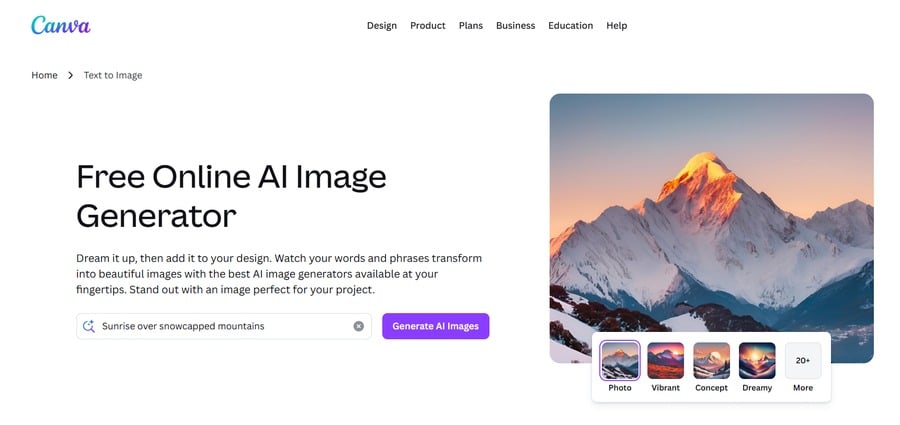
4. Canva AI

What is Canva AI best for:
Quick, simple, and beginner-friendly illustrations for basic children’s books.
Key capabilities:
- Extremely easy to use (drag-and-drop interface)
- Integrated with layout and publishing tools
- Free + paid plans available
- Limited artistic depth compared to advanced tools
- Ideal for educators and first-time creators
- Built-in templates for book layouts
5. Recraft V4

What is Recraft V4 best for:
Consistent character generation and vector-style illustrations for scalable publishing.
Key capabilities:
- Strong character consistency across generations
- Supports vector and scalable outputs
- Fast generation with clean outputs
- Freemium model with paid upgrades
- Ideal for maintaining visual continuity in books
- Growing popularity among professional creators
Quick Comparison of AI Illustration Tools
| Tool | Best For | Strength | Limitation | Ease of Use | Commercial Use |
|---|---|---|---|---|---|
| Midjourney | Stylised storybook visuals | High artistic quality, mood | Weak consistency | Medium | Yes (paid) |
| DALL·E | Clean, versatile illustrations | Strong prompt accuracy | Less artistic depth | Easy | Yes |
| Adobe Firefly | Commercial-safe design | Licensed data, brand-safe | Requires the Adobe ecosystem | Medium | Yes |
| Canva AI | Beginner-friendly creation | Simple, fast workflows | Limited detail/style | Very Easy | Yes |
| Recraft V4 | Character consistency | Consistent outputs, vector support | Still evolving | Easy | Yes |
Bring your children's book project to life with expert printing that elevates every image. Place your order with Ex Why Zed and print with confidence.
How to Create Children's Book Illustrations Using AI Step by Step?

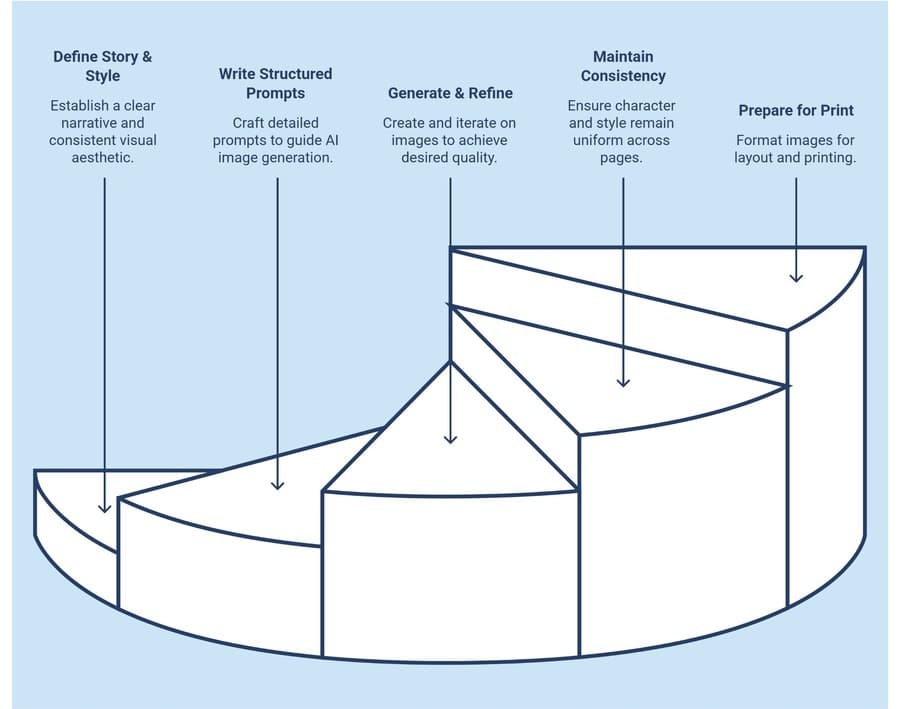
Creating children’s book illustrations with AI is not just about generating images. It requires a clear process to maintain consistency, visual quality, and storytelling flow from the first idea to the final print-ready pages.
Here’s a structured workflow to help you move from concept to completed illustrations effectively.
Step 1: Define The Story And Visual Style
Start by grounding your illustrations in a clear story direction.
Outline your core narrative in simple terms. Identify your main character, their goal, and the journey they go through. This ensures every visual supports the story instead of feeling disconnected.
Next, decide on a consistent visual style. Whether you choose a whimsical cartoon look, soft watercolour textures, or an educational illustration style, locking this in early prevents inconsistency later.
To strengthen this further, create a simple style reference. This can include two to three visual examples or a clear descriptive direction such as “soft pastel storybook with warm lighting.” This becomes your anchor for every image you generate.
Step 2: Write Structured And Detailed Prompts
The quality of your illustrations depends heavily on how you write your prompts.
Start with clear character descriptions. Include age, physical features, clothing, and expressions. For example, “a cheerful six-year-old girl with curly hair wearing a yellow dress.”
Then layer in the environment and mood. Define the setting, lighting, and atmosphere, such as a sunny park, magical forest, or calm bedtime scene.
Most importantly, follow a consistent prompt structure. Using a repeatable format like character + setting + style helps maintain visual consistency across all pages.
Step 3: Generate, Compare, And Refine
Avoid relying on a single output.
Generate multiple variations for each scene to explore different compositions, angles, and interpretations. This gives you options instead of forcing you to fix a weak image.
Refine your prompts based on results. If something feels off, adjust specific elements rather than rewriting everything. Small changes often lead to better outputs.
Once you identify strong visuals, improve them further through upscaling, minor edits, or corrections to enhance clarity and quality.
Step 4: Maintain Character Consistency Across Pages
Consistency is one of the biggest challenges in AI-generated illustrations.
Repeat your core character description in every prompt to reduce variation. Even small changes in wording can lead to noticeable differences in appearance.
Where possible, use reference images from earlier outputs. Many tools allow you to guide new generations using existing visuals, which helps maintain the same character look.
Pay close attention to small details like clothing, colours, and proportions. These tend to shift subtly and need manual correction to keep the character recognisable throughout the book.
Step 5: Prepare Images For Layout And Print
Before finalising your illustrations, make sure they are ready for book production.
Resize images based on your book format and layout. Whether you are using full-page spreads or smaller illustrations, planning this early avoids cropping issues later.
Ensure print quality by exporting images at 300 DPI and using high-quality formats like PNG or JPEG.
Finally, organise your illustrations alongside the text in sequence. This helps you review the storytelling flow and catch any gaps before moving to printing.
What Are the Best Prompts to Illustrate a Children's Book Using AI?
The best prompts aren’t just descriptive; they’re structured, repeatable, and specific enough to produce consistent results. Below are ready-to-use prompts you can copy, along with what kind of output you should expect:
Prompt 1: Storybook Character Introduction
Use this when: Creating your main character for the first time
Prompt:
“a cute 7-year-old boy with curly brown hair, wearing red overalls and yellow sneakers, smiling, standing in a bright meadow with flowers, soft watercolour style, warm lighting, children’s book illustration, highly detailed, gentle textures”
Expected result:
- Soft, storybook-style character
- Warm, inviting colours
- Clear focus on character design
- Ideal for cover or introduction page
Prompt 2: Magical Environment Scene
Use this when: Building immersive backgrounds or fantasy worlds
Prompt:
“a magical forest with glowing mushrooms, tall twisted trees, fireflies floating in the air, dreamy atmosphere, soft pastel colour palette, watercolour children’s book illustration, cinematic lighting”
Expected result:
- Rich, atmospheric background
- Fantasy elements with depth
- Strong mood and lighting
- Great for full-page spreads
Prompt 3: Character in Action Scene
Use this when: Showing story progression or movement
Prompt:
“a little girl with black pigtails, wearing a yellow dress, running happily through a sunny park, butterflies around her, bright colours, cartoon style, playful mood, children’s book illustration”
Expected result:
- Dynamic pose and storytelling
- Bright, energetic composition
- Clear emotional tone (joy/playfulness)
- Works well for middle pages
Prompt 4: Consistent Character Prompt (Reusable Template)
Use this when: Maintaining character consistency across pages
Prompt template:
“[character description], [specific action], [environment], same style as previous, soft watercolour children’s book illustration, consistent character design, warm lighting”
Example:
“a cheerful fox with orange fur and a blue scarf, sitting and reading a book, inside a cosy treehouse, same style as previous, soft watercolour children’s book illustration, consistent character design”
Expected result:
- Similar-looking character across scenes
- Reduced variation issues
- More cohesive book visuals
Prompt 5: Simple Educational Illustration
Use this when: Creating clean, easy-to-understand visuals
Prompt:
“simple flat illustration of a smiling sun, clouds, and green hills, bright colours, minimal details, clean lines, educational children’s book style”
Expected result:
- Clean, distraction-free design
- Easy for young readers to understand
- Ideal for early learning books
If your prompts are vague, your results will be inconsistent. But if you use structured, reusable prompts like these, AI becomes far more reliable, helping you create illustrations that actually look like they belong in the same children’s book.
Want to create a photobook yourself? Dive into our step‑by‑step guide on how to make a photobook from start to finish, perfect for photographers ready to bring their images into print.
How Can Ex Why Zed Help Turn AI Illustrations Into a Professionally Printed Children’s Book?
Creating AI illustrations is only the first step, turning them into a polished, print-ready children’s book is where most creators struggle. Ex Why Zed bridges that gap by transforming your generated visuals into a cohesive, high-quality book that looks professional, consistent, and ready for the market.
Why creators choose Ex Why Zed?
- Specialises in producing visually rich books, including children’s titles and illustrated projects
- Refines and adjusts AI visuals to ensure consistency, clarity, and print accuracy
- Wide range of finishes that enhance colours, textures, and overall visual appeal
- Maintains visual integrity when converting digital illustrations into print
- Helps structure your book so images and text flow naturally across pages
- Ensures every illustration meets professional DPI and print standards
- Full control over size, format, materials, and finishing touches
- Clear timelines and costs, so you can plan your project with confidence
With Ex Why Zed, your AI-generated ideas don’t just stay digital, they become a professionally crafted children’s book that feels intentional, cohesive, and ready to impress readers, publishers, or buyers.
Ready to turn your AI illustrations into a real book? Get started with Ex Why Zed and bring your story to life in print.
Conclusion
AI has fundamentally changed how children’s books can be created, making illustration more accessible than ever. However, the difference between a basic AI-generated book and a professional-quality publication lies in execution, refinement, and production standards.
Start by experimenting with tools, developing a structured workflow, and focusing on consistency. Once your concept is validated, investing in professional support can elevate your book to a level that truly stands out in the market.
FAQs
Can I publish a children’s book illustrated with AI?
Yes, you can publish an entire book using artificial intelligence tools like an AI book illustration generator or AI art generator, as long as licensing allows commercial use. Many AI image generators offer tutorials and customisation options to create content suitable for young readers.
Do AI illustrations look professional enough for books?
AI illustrations can look professional when created with advanced image-generation tools and refined prompts. A skilled AI children’s book illustrator's approach ensures clarity, balanced background elements, and a strong reading experience, though some editing may still be needed for consistent realism.
Is AI cheaper than hiring an illustrator?
Using an AI children’s book illustrator or book illustration generator is usually more cost-effective than hiring a traditional children’s book illustrator. However, pricing may still include app subscriptions, accessories, and editing costs, depending on the generators and the level of customisation required.
How do I keep characters consistent in AI illustrations?
To maintain consistency, use structured prompts, repeat descriptors, and reference images within AI image generators. Many generators and tools on platforms like Discord support customisation, helping preserve character design, background elements, and clarity across a short story or entire book.
What resolution is required for printing children’s books?
For high-quality image generation, at least 300 DPI is required to maintain clarity in print. Most AI art generator tools and image generators allow exporting high-resolution files, ensuring illustrations look sharp and engaging for young readers, including toddlers.
Which AI tool is best for beginners?
Beginner-friendly AI image generators like Canva AI or similar app-based tools offer easy steps, simple interfaces, and helpful tutorials. These platforms act as AI book illustration generators, making it easier for first-time users to create visuals with creative freedom.
Can AI replace human illustrators completely?
Artificial intelligence cannot fully replace a children’s book illustrator, as human creativity and storytelling remain unmatched. While AI children’s book illustrator tools offer speed, realism, and creative freedom, they still rely on human input to enhance the overall reading experience.
Do I need design skills to use AI illustration tools?
You don’t need advanced skills to use an AI art generator or book illustration generator, as most tools provide easy steps and tutorials. However, basic design knowledge improves customisation, clarity, and the overall quality of image generation for a polished reading experience.